---
layout: default
title: Image Levelling
---
## NanoLocz User Guide  Installation - - Getting Started - - Saving Data \
Level - -
Detect - -
FineAlign - -
Localize\
Area Analysis - - Keyboard Shortcuts\
Simulation AFM - - YouTube Video Tutorials
# Image Levelling

### Manual Leveling
**Plane Leveling:**\
To remove tilt or bow in images:
* Set the x and y Plane values to perform polynomial fitting to all the x and/or y values in each image.
* Plane fitting is previewed in real-time.
* Press the 'Accept' button to apply.
* Tip: X and Y values of 1 will remove linear tilt, values of 2 or more can remove image bow.
**Line Leveling:**\
To remove height variations between scan lines:
* Set the x and y Line values to perform polynomial fitting to each image line in x and/or y.
* Line fitting is previewed in real-time.
* Press the 'Accept' button to apply.
* Tip: use '-Med' to remove the median of each line in x.
**Line or Plane Leveling with a Mask:**\
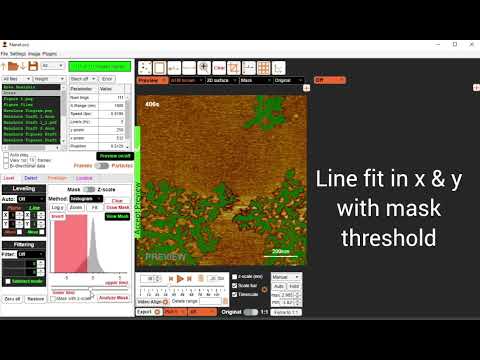
To level images and movies that contain a variety of height levels requires certain regions (referred to as masked regions) to be excluded from the polynomial fits. Typically the included region should be a surface which is expected to be level and has a high coverage (>50%).
The options to generate a mask are:
1) Using the upper and lower threshold values on the height histogram
2) Manually drawing using the **Draw Mask** button
3) Using the 'Mask with z-scale' to mask values outside of the colormap scale
4) Automatically using the Otsu method
5) Automatically using the **Fit** button (fits a Gaussian to all the values in the movie and using 1.5σ (standard deviation) as the threshold values.)
* To level with a mask, line leveling or plane leveling is then performed as before but fitting is performed using only the non-masked values.
* Press the 'Accept' button to apply.
### Automatic Leveling
Leveling typically requires multiple iterations, to achieve this automatically several pre-set leveling routines are implemented in NanoLocz. For example the ‘Iterative Holes’ and ‘Iterative Peaks’ routines which use the following routine:
1. Subtract a plane fit in x and y with 2nd order polynomial then subtract the median line in x.
2. Fit a Gaussian to all the heights in the movie and set a mask threshold to
z > 1.5σ (Iterative Peaks) or z <-1.5σ (Iterative Holes) to generate a mask.
3. Repeat leveling step 1. with the threshold mask applied.
4. Generate new mask by repeating step 2.
5. Subtract a plane fit in x and y with 2nd order polynomial then subtract a 1st order polynomial line in x with the threshold mask applied.
‘Iterative Holes’ and ‘Iterative Peaks’ automatic leveling routines are designed for image sets with a fraction of lower features such as membrane defects (Iterative Holes) or a fraction of objects with higher features such as features on a mica surface (Iterative Holes). Other iterative leveling routine in NanoLocz include basic leveling followed by Otsu mask leveling or leveling followed by two leveling iterations with Gauissan fitted masks for z outside the range of +/-1.5σ
## YouTube video on Leveling + Area Analysis
[](https://www.youtube.com/watch?v=R5D6T04M7Rc)
Installation - - Getting Started - - Saving Data \
Level - -
Detect - -
FineAlign - -
Localize\
Area Analysis - - Keyboard Shortcuts\
Simulation AFM - - YouTube Video Tutorials
# Image Levelling

### Manual Leveling
**Plane Leveling:**\
To remove tilt or bow in images:
* Set the x and y Plane values to perform polynomial fitting to all the x and/or y values in each image.
* Plane fitting is previewed in real-time.
* Press the 'Accept' button to apply.
* Tip: X and Y values of 1 will remove linear tilt, values of 2 or more can remove image bow.
**Line Leveling:**\
To remove height variations between scan lines:
* Set the x and y Line values to perform polynomial fitting to each image line in x and/or y.
* Line fitting is previewed in real-time.
* Press the 'Accept' button to apply.
* Tip: use '-Med' to remove the median of each line in x.
**Line or Plane Leveling with a Mask:**\
To level images and movies that contain a variety of height levels requires certain regions (referred to as masked regions) to be excluded from the polynomial fits. Typically the included region should be a surface which is expected to be level and has a high coverage (>50%).
The options to generate a mask are:
1) Using the upper and lower threshold values on the height histogram
2) Manually drawing using the **Draw Mask** button
3) Using the 'Mask with z-scale' to mask values outside of the colormap scale
4) Automatically using the Otsu method
5) Automatically using the **Fit** button (fits a Gaussian to all the values in the movie and using 1.5σ (standard deviation) as the threshold values.)
* To level with a mask, line leveling or plane leveling is then performed as before but fitting is performed using only the non-masked values.
* Press the 'Accept' button to apply.
### Automatic Leveling
Leveling typically requires multiple iterations, to achieve this automatically several pre-set leveling routines are implemented in NanoLocz. For example the ‘Iterative Holes’ and ‘Iterative Peaks’ routines which use the following routine:
1. Subtract a plane fit in x and y with 2nd order polynomial then subtract the median line in x.
2. Fit a Gaussian to all the heights in the movie and set a mask threshold to
z > 1.5σ (Iterative Peaks) or z <-1.5σ (Iterative Holes) to generate a mask.
3. Repeat leveling step 1. with the threshold mask applied.
4. Generate new mask by repeating step 2.
5. Subtract a plane fit in x and y with 2nd order polynomial then subtract a 1st order polynomial line in x with the threshold mask applied.
‘Iterative Holes’ and ‘Iterative Peaks’ automatic leveling routines are designed for image sets with a fraction of lower features such as membrane defects (Iterative Holes) or a fraction of objects with higher features such as features on a mica surface (Iterative Holes). Other iterative leveling routine in NanoLocz include basic leveling followed by Otsu mask leveling or leveling followed by two leveling iterations with Gauissan fitted masks for z outside the range of +/-1.5σ
## YouTube video on Leveling + Area Analysis
[](https://www.youtube.com/watch?v=R5D6T04M7Rc)