---
layout: default
title: Installation
---
## NanoLocz User Guide  Installation - - Getting Started - - Saving Data \
Level - -
Detect - -
FineAlign - -
Localize\
Area Analysis - - Keyboard Shortcuts\
Simulation AFM - - YouTube Video Tutorials
# Installation of NanoLocz
To download the file needed go to Releases.
Download one of the following files from `assets`.
### **Windows desktop app**
- Download: `NanoLocz1_2_Win_Installer.exe` from [Releases](https://github.com/George-R-Heath/NanoLocz/releases).
- Unzip and run the exe to install.
- Admin rights likely needed to install.
- Note: loading on start-up of the app can take longer the 1st time running (up to 1 min) for Windows versions
### **Mac desktop app**
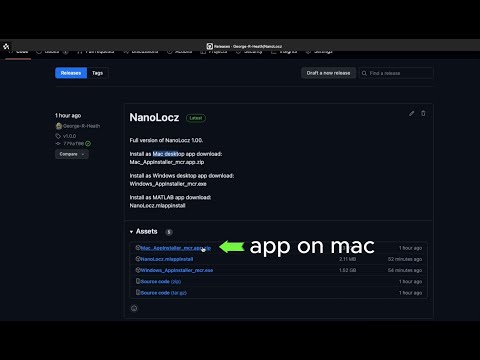
- Download `NanoLocz_Mac_Installer_web.app.zip` from [Releases](https://github.com/George-R-Heath/NanoLocz/releases).
- Unzip and run the app file to install.
- You may get an "NanoLocz can't be opened because it is from an unidentified developer" message, which can be bypassed by right clicking on NanoLocz_Mac_Installer_web.app and selecting "Open" from the drop down menu.
- Note: loading on start-up of the app can take longer the 1st time running (up to 1 min) for Mac versions
### Youtube video: Desktop standalone app Installation
[](https://m.youtube.com/watch?v=EfYbIf45AHo)
### **MATLAB app**
- Download `NanoLocz.1.2.mlappinstall` from [Releases](https://github.com/George-R-Heath/NanoLocz/releases).
- Open 'NanoLocz.mlappinstall' file.
- This will open MATLAB if not already open and ask you to install.
- Once installed the app can be used from the apps tab. For quick access right click the NanoLocz app to add to Favourites and/or Quick Access Toolbar.
- Requires MATLAB and MATLAB Toolboxes: MATLAB 2020a (the newer the better), Curve Fitting Toolbox, Image Processing Toolbox, Signal Processing Toolbox, Statistics and Machine Learning Toolbox, Bioinformatics Toolbox, Computer Vision Toolbox.
### Youtube video: MATLAB app Installation
[](https://m.youtube.com/watch?v=155rN7DYzu4)
Installation - - Getting Started - - Saving Data \
Level - -
Detect - -
FineAlign - -
Localize\
Area Analysis - - Keyboard Shortcuts\
Simulation AFM - - YouTube Video Tutorials
# Installation of NanoLocz
To download the file needed go to Releases.
Download one of the following files from `assets`.
### **Windows desktop app**
- Download: `NanoLocz1_2_Win_Installer.exe` from [Releases](https://github.com/George-R-Heath/NanoLocz/releases).
- Unzip and run the exe to install.
- Admin rights likely needed to install.
- Note: loading on start-up of the app can take longer the 1st time running (up to 1 min) for Windows versions
### **Mac desktop app**
- Download `NanoLocz_Mac_Installer_web.app.zip` from [Releases](https://github.com/George-R-Heath/NanoLocz/releases).
- Unzip and run the app file to install.
- You may get an "NanoLocz can't be opened because it is from an unidentified developer" message, which can be bypassed by right clicking on NanoLocz_Mac_Installer_web.app and selecting "Open" from the drop down menu.
- Note: loading on start-up of the app can take longer the 1st time running (up to 1 min) for Mac versions
### Youtube video: Desktop standalone app Installation
[](https://m.youtube.com/watch?v=EfYbIf45AHo)
### **MATLAB app**
- Download `NanoLocz.1.2.mlappinstall` from [Releases](https://github.com/George-R-Heath/NanoLocz/releases).
- Open 'NanoLocz.mlappinstall' file.
- This will open MATLAB if not already open and ask you to install.
- Once installed the app can be used from the apps tab. For quick access right click the NanoLocz app to add to Favourites and/or Quick Access Toolbar.
- Requires MATLAB and MATLAB Toolboxes: MATLAB 2020a (the newer the better), Curve Fitting Toolbox, Image Processing Toolbox, Signal Processing Toolbox, Statistics and Machine Learning Toolbox, Bioinformatics Toolbox, Computer Vision Toolbox.
### Youtube video: MATLAB app Installation
[](https://m.youtube.com/watch?v=155rN7DYzu4)